Bought a new phone, or thinking about buying a used one? Before you hand over the money, check whether it’s PTA approved. A phone that isn’t registered with PTA can stop working on Jazz, Zong, Telenor and Ufone SIMs, and fixing it later means paying tax.
The good news is that checking takes less than a minute. You only need the phone’s IMEI number, and you can check it by SMS, on the PTA website or with the official app. This guide shows all three methods and explains what each result means.
What Does PTA Approved Mean?
PTA (Pakistan Telecommunication Authority) runs a system called DIRBS, which keeps a record of every mobile phone allowed on Pakistani networks. Each phone is identified by its IMEI number. If the IMEI is in the system as approved, the phone works normally with any local SIM.
Phones sold officially in Pakistan are already approved. Phones brought from abroad, or bought from shops selling imported stock, usually need to be registered and have their tax paid before they can be used long term.
Step 1: Find Your Phone’s IMEI Number
Open the dialer on your phone, type *#06# and the IMEI will appear on the screen straight away. You don’t need to press call. This code works on every phone, from a basic Nokia keypad phone to the latest iPhone or Samsung.
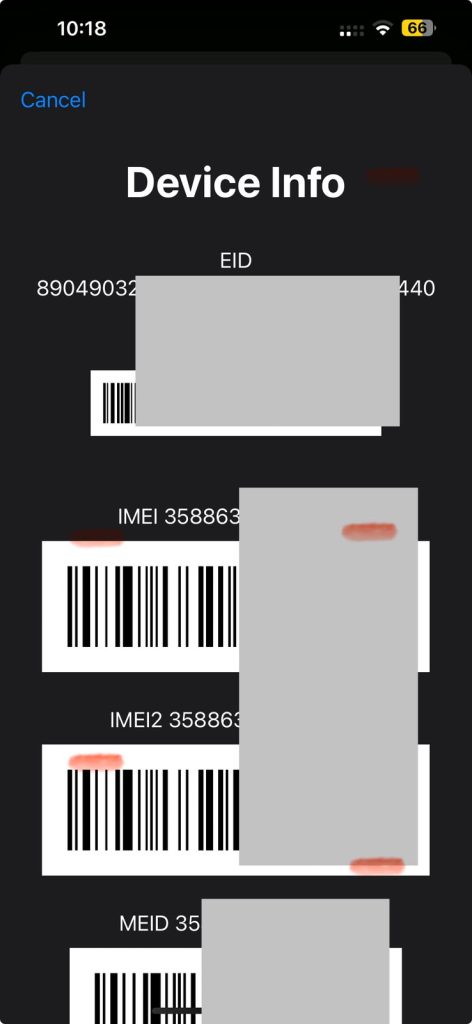
If your phone is dual SIM, you will see two IMEI numbers. Note down both, because each one needs to be checked separately.
You can also find the IMEI printed on the phone’s box, or in Settings under About phone. If you’re buying a used phone, make sure the IMEI on the screen matches the one on the box. A mismatch is a big warning sign.
Method 1: Check PTA Status by SMS (8484)
This is the quickest method and works from any network.
- Open your messages app and create a new message.
- Type the 15 digit IMEI number, with no spaces.
- Send it to 8484.
Within a few seconds you’ll get a reply telling you whether the device is compliant (approved) or not. For a dual SIM phone, send a separate SMS for each IMEI. Standard SMS charges may apply.
Method 2: Check on the PTA DIRBS Website
If you prefer checking on a computer or don’t want to use SMS, the PTA website does the same job.
- Go to dirbs.pta.gov.pk.
- Scroll down to the box called Check status of your device.
- Enter the 15 digit IMEI, tick the “I’m not a robot” box and click Check.
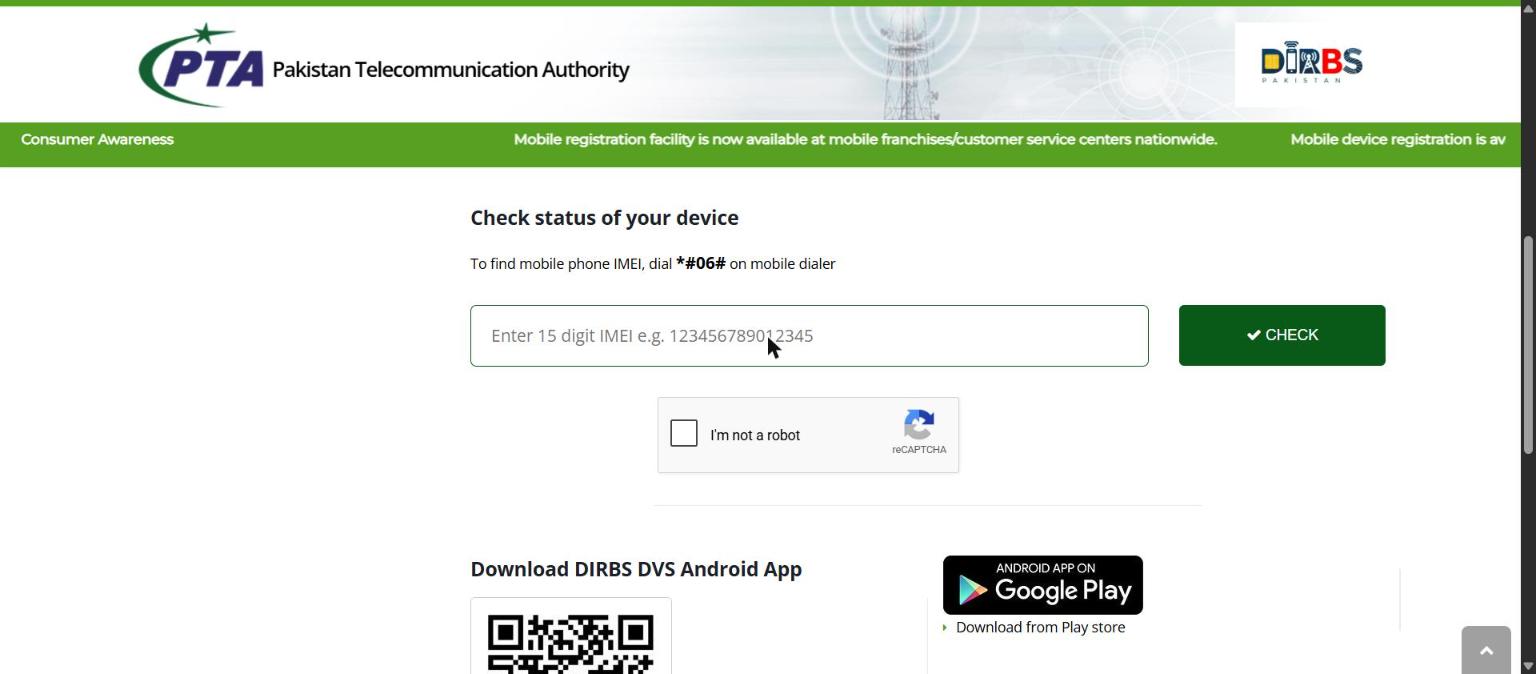
The result shows the phone’s brand, model and whether it’s approved. This is also a handy way to confirm that a used phone really is the model the seller claims.
Method 3: Check With the DIRBS DVS App
PTA also has an official Android app called DIRBS DVS, available on the Google Play Store. Install it, enter the IMEI or scan the barcode from the phone’s box, and it shows the status instantly. It’s useful if you check phones often, for example when buying and selling used devices.
What Your Result Means
| Result | What it means | What to do |
|---|---|---|
| Compliant / Approved | The phone is registered with PTA | Nothing. It will work with any Pakistani SIM. |
| Not compliant / Not registered | The phone hasn’t been registered or the tax hasn’t been paid | Register it through DIRBS and pay the duty, or don’t buy it. |
| Invalid IMEI | The number doesn’t match any real device | Recheck the IMEI. If it’s still invalid, the phone may be fake or tampered with. |
How to Register a Non-PTA Phone
If your phone isn’t approved, you can register it through the DIRBS website using your CNIC, the phone’s IMEI and your mobile number. The tax amount depends on the phone’s model and value, and the DIRBS site has a section called Know Individual Mobile Duties Via FBR where you can see how much you’ll pay before you start. Mobile operators’ customer service centres can also help with registration.
Phones brought from abroad are usually given a limited time to work before they get blocked, so it’s best to register as soon as you arrive. Check the current rules on the DIRBS website, since PTA updates them from time to time.
Quick Checklist Before Buying a Used Phone
- Dial *#06# and check the IMEI matches the box.
- Check every IMEI on DIRBS or by SMS to 8484.
- Make sure the brand and model in the result match the phone in your hand.
- Test the phone with your own SIM before paying.
For keypad phones, see our guide on Nokia secret codes, which also explains how to check if a Nokia 105 is original. Samsung owners can use the hidden test menus in our Samsung secret codes list to check the screen, speakers and sensors. Buying an iPhone? Read our tips for buying a second-hand iPhone first.
Frequently Asked Questions
Is checking PTA status free?
Checking on the DIRBS website and the DVS app is free. The SMS method to 8484 may cost a standard SMS charge depending on your network.
Can I check a phone without having it with me?
Yes. As long as you have the IMEI, for example from the box or from the seller, you can check it on the website or by SMS.
My phone is dual SIM. Do both IMEIs need to be approved?
Yes. Each IMEI is checked and registered separately. If only one is approved, only that SIM slot is covered.
What happens if I use a non-PTA phone?
It may work for a short time, but once it’s flagged as non-compliant it will stop connecting to Pakistani mobile networks. Wi-Fi will still work, but calls, SMS and mobile data won’t.
Will a PTA approved phone stay approved if I sell it?
Yes. Approval is linked to the phone’s IMEI, so it stays approved when it changes owners.